Right-click Remove Background: I Built a Native Windows Tool
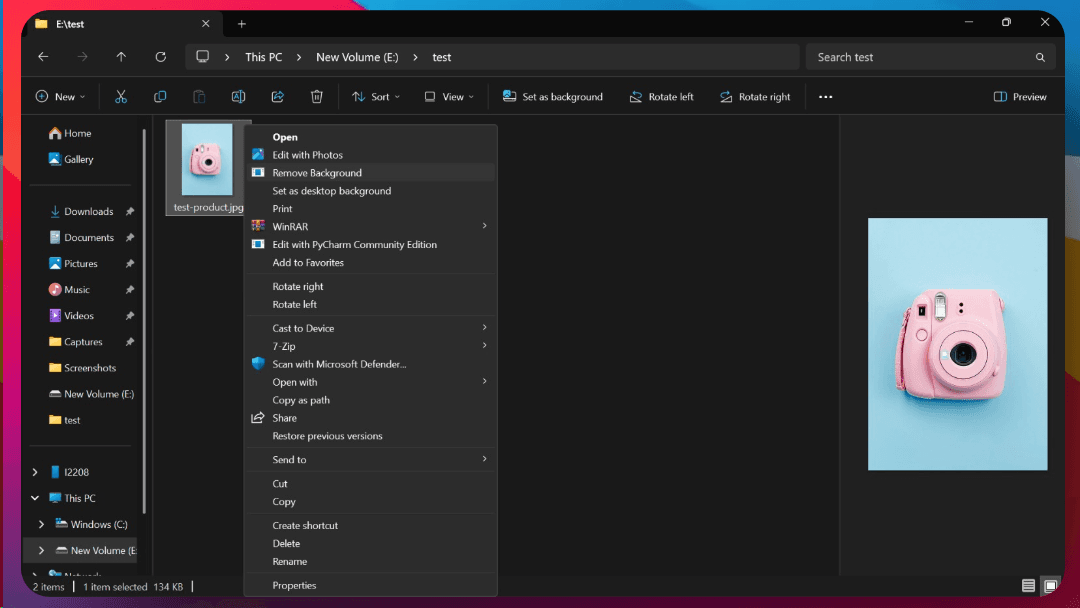
A tiny productivity tool I built in a few hours that removes image backgrounds with a single right-click — completely offline.
The Problem I constantly found myself needing to remove the background from images — quickly. Online tools worked, but they:
- Needed a stable internet connection
- Uploaded private images to a remote server
- Opened bulky web UIs
- Took too long for something so simple
- I didn’t want that.
The Solution: A Context Menu Tool for Windows So I built RemoveBG — a lightweight Windows desktop tool that:
- Works completely offline
- Runs via right-click context menu
- Uses AI under the hood
- Saves a new file like image_no_bg.png in the same folder
- No console popups, no clutter
How It Works Once installed:
- Right-click any .jpg or .png image
- Select Remove Background
- It processes the image instantly and creates a new _no_bg.png file next to it
All this is done locally on your device.
Privacy First
- No internet.
- No analytics.
- No file uploads.
- Just AI running on your machine.
This was important to me — privacy and speed over anything else.
Download It’s available for free on Windows: Download RemoveBG.exe
Support & Feedback If you find this helpful: Share it with a friend
Thanks for Reading